Source arrangements and output views
Choose the axis you actually want to change
Source organization, musical reuse, and printed layout are separate choices. A measures-first file can print a full score or one player's pages. A parts-first file can do both as well. Neither arrangement means “Score Page” or “Parts Page.”
| Choice | Forms | How to change it | Important boundary | |
|---|---|---|---|---|
| Music organization | Parts-first; measures-first | arrange=parts or arrange=measures | Reorganizes code, not selected output | |
| Source grouping | System or rehearsal groups | arrange=systems or arrange=rehearsals | Uses existing musical/layout boundaries; may decline unsupported structure | |
| Repeated music | Written-out parts; shared reader heads and named returns | consolidate; supported expand operations | Actual reuse is not whitespace compression | |
| Musical settings | Header maps; in-place settings | maps=top or maps=inline | Meter/key/tempo/transpose, not system/page cuts | |
| Headings | Label maps; inline headings | labels=top or labels=inline | Keep heading identity and address | |
| Exercise organization | Exercise index; exercise containers | exercises=top or exercises=inline | Different from naming a reusable music span | |
| Book organization | Section index; section containers | sections=top or sections=inline | Book sections are not instrument sections | |
| Engraved breaks | Inline cuts; addressed maps/layout block | Author in the correct scope; formatter chooses compact projection | No general maps=inline break switch | |
| Duration spelling | Numeric; letter values | durations=numbers or durations=letters | 4G and qG mean the same duration | |
| Key presentation | Open key; signature; inferred choice | key=open, key=signature, or key=auto | Review the selected signature; this is not transposition | |
| Chromatic pitch spelling | Authored spelling; directional chromatic spelling | chromatic | Changes enharmonic notation; inspect the musical context | |
| Octave spelling | Relative contour; explicit digits | Current formatter uses its built-in relative ladder | `octaves=minimal | explicit` is reserved, not an available switch |
| Code spacing | Aligned/readable; compact | Alignment/compact selectors and presets | A source newline is not a printed system break | |
| Output selection | Combined score; extracted part | Select output part/configuration | Does not require changing source orientation | |
| Pitch view | Authored; concert; written/transposed | Select the output pitch view | Authored can be mixed; display selection does not rewrite notes, keys, or source maps | |
| Staff grouping | Automatic family brackets; custom brackets/braces; none | staff_groups in the layout configuration | Groups existing staves; does not allocate piano hands or create parts | |
| Paper and engraving | Named score/part page configurations | Optional .engraving.json and host layout controls | Settings refine the selected view; source cuts still apply |
Text cleanup and linting are separate operations, not alternate music arrangements. strip-comments and strip-dev-text deliberately remove text; jargon-lint is advisory. Do not treat cleanup as lossless preservation of everything an author wrote. The standalone named-spans menu entry is still reserved even though consolidate already creates named spans inside shared heads.
These are supported choices, not a promise that every combination is transformable. Check the native option reference for this build's availability, and read normalization for prerequisites, refusal conditions, and comment handling.
Scope is a separate decision
| Fact belongs to | Place it in | Do not confuse it with |
|---|---|---|
| Whole score | Score-level setting or layout map | A full-score-only page configuration; global source cuts also affect parts |
| One player | That part's body, or its row inside a measure block | Every player in an instrument section |
| Shared passage | Shared reader head and addressed body | A detached variable that occupies no measures |
| One voice | That voice's music | A setting inherited by unrelated voices |
| One musical time | Its addressed measure or inline point | The physical text line containing it |
| One printed view | The selected score/part layout configuration | Changing the underlying music |
For paired parts-first and measures-first break examples, see page and system layout. For instrument sections, per-reader registers, and named exercise returns, see shared passages.
Preview normalization before applying it
In ScoreScript App builds with the Normalize menu, choose the native options, preview the source changes, then apply them when the result is what you want. Optional normalization on save repeats the selected rewrite; it is not merely a display filter. Use the host's layout/view controls when you only want a different printed score or part page.
From the CLI, inspect the result without overwriting your file:
scorescript format piece.scorescript --normalize arrange=measures,maps=inline
scorescript format piece.scorescript --normalize arrange=parts,consolidate
Add --write only when you want to replace the source. Review diagnostics and the diff, then check and render the result. Host controls depend on the installed host version; the website's native menu is not proof that an older application already exposes every option.
A divided part: chords, or voices
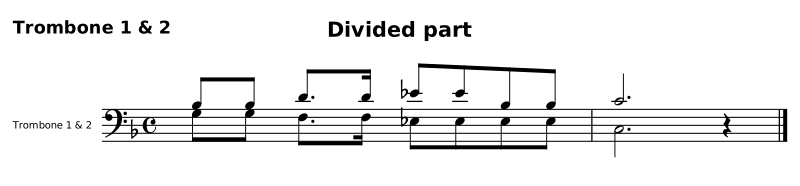
One part read by two players — trombone 1,2: "Trombone 1 & 2" — writes both players on one staff, and that staff has two spellings. Where the players' rhythms coincide, the two notes are a chord. Where they diverge, they are bar-local voices. Both are source spellings of the same music; neither one is the printed part, which is a view selected at output time.
scorescript 0.3
score "Divided part" {
  meter 4/4
  key F

  parts {
    trombone 1,2: "Trombone 1 & 2"
  }

  trombone {
    m1-2 {
      8[Bb3 G] [Bb G] 8.[D F3] 16[D F3] 8[Eb Eb3] [Eb Eb3] [Bb Eb3] [Bb Eb3] | 2.[C C3] 4r
    }
  }
}
Canonical spelling
scorescript 0.3
score "Divided part" {
  meter 4/4
  key F

  parts {
    trombone 1,2: "Trombone 1 & 2"
  }

  trombone {
    m1-2 {
      8[Bb3 G] [Bb G] 8.[D F3] 16[D F3] 8[Eb Eb3] [Eb Eb3] [Bb Eb3] [Bb Eb3] | 2.[C C3] 4r
    }
  }
}
explode opens each chord into one note per voice, top down, so voice 1 is the first player named in the roster:
scorescript explode piece.scorescript --part trombone --measures 1-2scorescript 0.3
score "Divided part" {
meter 4/4
key F
parts {
trombone 1,2: "Trombone 1 & 2"
}
trombone {
m1-2 {
v1 [ 8Bb3 Bb 8.D 16D 8Eb Eb Bb Bb | 2.C 4r ]
v2 [ 8G3 G 8.F 16F 8Eb Eb Eb Eb | 2.C 4r ]
}
}
}
Canonical spelling
scorescript 0.3
score "Divided part" {
  meter 4/4
  key F

  parts {
    trombone 1,2: "Trombone 1 & 2"
  }

  trombone {
    m1-2 {
      v1 [ 8Bb3 Bb 8.D 16D 8Eb Eb Bb Bb | 2.C 4r ]
      v2 [ 8G3 G 8.F 16F 8Eb Eb Eb Eb | 2.C 4r ]
    }
  }
}
Single notes and rests reach every voice; a chord with fewer members than voices gives its lowest member to the voices below. Dynamics, hairpins, directions and tempo words stay once, on voice 1; articulations, ties, slurs and glissandi follow the notes that carry them.
reduce is the way back. Voices that agree note for note — same onsets, same durations, rest against rest, and no direction on a voice past the first — become one chord, with unisons written once:
scorescript reduce piece.scorescript --part trombone --measures 1-2A bar whose voices do not agree keeps them and says why, naming the bar, the voice and the beat:
piece.scorescript:141:29: error[transform.voices-diverge]: m18 is left as
voices: voice 2 parts company with voice 1 at beat 3.
Both verbs default to every part and every bar; --part and --measures narrow them, --players opens to the roster's player count rather than to the widest chord, and --write replaces the file instead of printing to standard output. Both are idempotent, both write canonical source, and the score's MIDI is identical before and after — a bar that already divides, a cue, and a repeated bar are left exactly as they are.
Small notes and optional alternatives
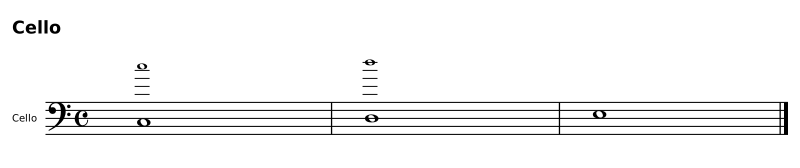
These are separate choices within the same part:
parts { vc }
vc {
  m1 { v1:small [ wC5 ] v2 [ wC3 ] }
  m2 { v1:small:optional [ wD5 ] v2 [ wD3 ] }
  m3 { wE3 }
}
Canonical spelling
parts {
  vc
}

vc {
  m1-3 {
    v1 small [ 1C5 ] v2 [ 1C3 ] | v1 small optional [ D ] v2 [ 1D ] | E3
  }
}
small (sm) controls size. optional (opt) identifies an alternative. Combine them as v1:sm:opt; 1:optional and voice 1:optional also work. Small notes still play. Optional voices are omitted by default; an engine playback option can include them. Neither spelling means a quotation from another part. The following direct bar returns to an ordinary voice.
Use qualifications on a whole-part voice when all its bars share them. Use local groups in the measure collection when size or optional status changes.
MusicXML preserves small size and includes ScoreScript metadata for optional status. Its export report notes that other applications may not honor optional playback. Mixed sizes within a single imported voice-bar are reported; they do not silently resize that entire bar.