Consolidation and normalization
Normalization changes how existing music is represented. Choose the operation by what you want to change; “shorter source” can mean several different things.
| Operation | What changes |
|---|---|
| Formatting | Canonical spelling and layout of the chosen source arrangement |
| Consolidation | Repeated musical material becomes shared readers and named returns |
| Expansion | Shared music becomes separately written-out player parts |
| Chapters | A chapter in another key is written out in full, or written as that chapter in a new key |
| Set-up | What every movement repeats is stated once in the book's head, or written in each movement; numbers and reader heads likewise |
| Page turns | An exercise written twice to turn some readers' pages is written once with page before, or the turns go back into its heads |
| Pitch source | Notes, key signatures and transpose maps become Concert or Written together, preserving sound |
| Orientation | Parts-first versus measures-first, systems, or rehearsal groups | | Map placement | Settings or collection structure at the top versus beside the music |
Convert the source's pitch basis
In ScoreScript App, choose Normalize → Spelling → pitch → Concert Pitch or Transposed (written pitch). Preview shows the proposed source changes; Apply makes one undoable change. Run this on save is optional: repeating the same destination does not transpose the notes again.
The native CLI accepts --normalize pitch=written and --normalize pitch=concert. Plain formatting leaves the authored pitch basis alone. For a notation-only change, use the output pitch selector instead.
Written source uses each known instrument's interval and preserves intervals already explicitly authored. Notes and signatures change together with the part's transpose map. A part-local key {m1 D, m9 G} affects only that player; the score key remains the default for parts without local keys.
scorescript 0.3
score "Written ensemble" {
  meter 4/4

  parts {
    flute
    clarinet-bb
  }

  flute {
    key C

    m1 {
      4C5 D E F
    }
  }

  clarinet-bb {
    key D

    transpose -1 -2
    m1 {
      4D5 E F# G
    }
  }
}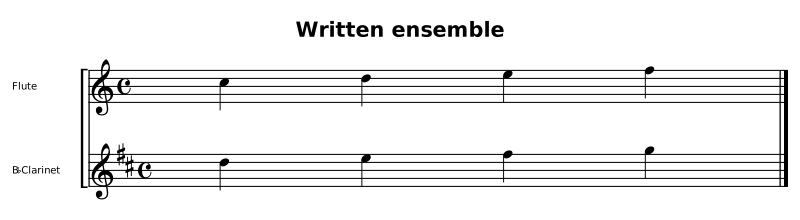
Example notes (1)
- part B-flat Clarinet: `transpose` marks already-written source; this authored view does not convert it to concert pitch
Canonical spelling
scorescript 0.3
score "Written ensemble" {
  meter 4/4

  parts {
    flute
    clarinet-bb
  }

  flute {
    key C

    m1 {
      4C5 D E F
    }
  }

  clarinet-bb {
    key D

    transpose -1 -2
    m1 {
      4D5 E F# G
    }
  }
}
Both players sound the same passage. The clarinet's source carries the player's written notes and signature together with its sounding interval.
Conversion refuses the whole rewrite if it cannot prove the target safe. Shared lines require explicit expand first (the two options can be selected together); chord formulas currently require literal chord pitches. Convert linked or nested exercises in their owning score first. An unknown instrument needs an explicit written interval; the converter does not guess one. Custom unknown intervals removed by conversion to concert cannot later be inferred.
These controls require a build containing the native pitch-source option; older app installations do not gain it from a website or chat update.
The source language for defining and reusing an exercise is in named exercises and shared passages. The operations below can discover that structure in existing written-out music. They do not require rewriting every part by hand.
Find the options in your installed engine
scorescript format --list
scorescript docs normalization
The normalization option reference is generated from the native engine's menu, including presets and unavailable entries. Use the names shown by your installed engine. If an older installed CLI lacks an option, update that CLI; a scorescript 0.3 file header alone does not establish which implementation features are installed.
Updated option names
Current builds use the shorter names below. Earlier names are refused with replacement guidance; they are not additional aliases. Update saved commands and application selections when updating the engine. This does not rename keywords inside your music or require rewriting your score files.
| Earlier name | Current name |
|---|---|
orientation | arrange |
compression | preset |
maps-labels | labels |
maps-exercises | exercises |
maps-sections | sections |
chromatic-spelling | chromatic |
The measure-first choice is arrange=measures, formerly orientation=grid. maps=top|inline is unchanged and still covers musical context placement, not every map or every kind of layout break.
Automatic musical consolidation
scorescript check piece.scorescript
scorescript format piece.scorescript --normalize consolidate > piece.review.scorescript
scorescript check piece.review.scorescript
Review the new source and rendered parts before replacing the original. Never redirect output onto the input filename: the shell truncates it before the formatter can read it. --write is the explicit in-place alternative.
Consolidation recognizes identical part material, constant spelled transpositions, octave-related readings, and repeated ranges that can become named transposed returns. It can produce both fl5, ob4 { ... } and m17-32 = primary +P4: actual reuse, not merely fewer line breaks.
It re-analyzes the proposed music and abandons a rewrite if its musical comparison changes. This is not permission to discard a saved revision: printed layout and editorial text still need review.
When consolidation leaves music alone
- Fewer than two eligible parts: automatic discovery needs parts to share. It is not a general solo repetition finder. Manually authored named ranges still work for one reader.
- Already-shared source: the current pass leaves a score with reader heads alone, including mixed source with additional written-out parts.
- Measure-first source: first request
arrange=parts. - Exercise containers: first request
exercises=topif a flat collection is appropriate. The current pass acts on the score's own parts, not nested movement programs. Preserve movement boundaries. - Different musical material: a genuine variant stays written out; the pass does not approximate it to make it fit a shared line.
- Independent voices, implicit parts, unaddressable names, or unsafe repeated instrument selection can prevent a part from joining.
- Player-specific state and layout can require retaining a part block.
hoist-breaksmoves only matching per-part system/page maps to score scope; do not manually globalize one player's distinct page breaks.
Read the operation notes on standard error. A successful command can report that a requested transformation was refused and leave that structure unchanged. Do not treat exit status alone as proof that consolidation happened.
Comments attached to bodies that consolidation folds are removed. Comments in surviving bodies and at file level remain. This is separate from strip-comments, which explicitly removes all // comments. Keep important editorial commentary in a saved revision before folding its owning body.
Presets and deliberate combinations
scorescript format piece.scorescript --normalize preset=readable
scorescript format piece.scorescript --normalize preset=condensed
scorescript format piece.scorescript --normalize preset=max
readable aligns columns and puts maps at the top. condensed leaves the columns unpadded and requests numeric durations and matching-break hoisting. max adds actual consolidation and removal of recognized development text. It is not just a whitespace setting, and it is not a promise that every score can be reduced to one body. The generated reference lists each exact expansion.
For an eligible written-out grid or exercise collection, an explicit request is:
scorescript format piece.scorescript --normalize arrange=parts,exercises=top,consolidatePasses run in the engine's defined pipeline order, not as a left-to-right sequence of arbitrary rewrites. For repeated choices of the same option, the last written value wins, including across repeated --normalize flags. A preset expands where it appears, so preset=max,align=on restores alignment while keeping that preset's other selections. Do not select expand and consolidate together: they are opposing operations and the request is refused. Prefer one preset plus explicit overrides: a later preset does not cancel an earlier action that its own expansion does not mention.
Spaces around = are allowed inside a quoted selection, such as --normalize 'preset = condensed'. A preset requires a value: bare preset is an error. Switches use on or off; bare align means on. Argumentless actions such as strip-comments do not take =off or any other value. To leave comments alone, omit the action; strip-comments=off is refused.
Readability without changing musical ownership
scorescript format piece.scorescript --durations numbers
scorescript format piece.scorescript --durations letters
scorescript format piece.scorescript --normalize arrange=measures,maps=top
scorescript format piece.scorescript --normalize arrange=systems
scorescript format piece.scorescript --normalize arrange=rehearsals
Choose part-first source to follow one player's line, and measure-first source to compare players at the same bars. System and rehearsal orientations group around those landmarks. Orientation changes can be refused when the current structure cannot be safely represented; inspect the operation notes.
A part-first body groups its bars in blocks of eight, m1-8 { … }, so a bar number stands at the head of every eight bars. bar-blocks=whole writes one block for each run of consecutive bars instead, opening a new block only where one must open anyway — at a written \n or \p, a heading, a voice change or a cue. It is a layout of the same bars: the music and the pages do not change, and bar-blocks=eight writes the landmarks back. bar-blocks=one gives each bar its own addressed body, for editing bars individually.
scorescript format piece.scorescript --normalize bar-blocks=wholeTwo more layout options choose how much of the page a movement's head and its short lists take, and change no statement:
scorescript format book.scorescript --normalize head-facts=line
scorescript format book.scorescript --normalize lists=line
head-facts=lines (the default) writes a movement's number, title, subtitle, meter, key, tempo and partial one a line; head-facts=line writes them together on the movement's first line, two spaces apart: title "Waltz" meter 3/4 key F tempo {Playful}. lists=standard (the default) writes a parts { … } roster one player a line and a reader set or a page before line's readers on one line; lists=line writes every one of them on one line, parts { fl, ob, tpt }, and lists=lines one entry a line. Like bar-blocks, each is a layout of the same source, and the default layout writes it back.
There is no whitespace-stripping option: the old compact switch was removed on 2026-09-11 because it threw away the indentation, padding, blank lines and row breaks the formatter exists to produce. Shorter source comes from consolidation and break hoisting, never from removing formatting. Newlines can separate measures or simultaneous voices; arbitrary whitespace removal can change or invalidate the music.
Maps, exercises, and book sections
maps=top|inline controls meter, key, tempo, and transpose placement. With maps=inline, rehearsal marks remain in RH, tempo words remain in a tempo map, and multirest boundaries remain in multi-map. These markings keep their measure addresses; numeric tempo settings use inline contexts. It does not select inline versus mapped system/page cuts. The formatter chooses break-map emission separately; see page and system layout. It does not mean “convert every kind of map.” Written headings have labels=top|inline; exercises have exercises=top|inline; book sections have sections=top|inline.
scorescript format piece.scorescript --normalize exercises=inline,sections=inline
scorescript format piece.scorescript --normalize exercises=top,sections=top
At the inline door, each exercise owns its music and starts locally at m1. At the top/index door, the timeline is numbered continuously. Book sections need exercise containers before they can hold them inline; request both inline operations together. See collections for both forms.
Chapters in other keys
chapters=explicit|instances is the door between a chapter written as another chapter in a new key (movement =f-scales = c-scales in Eb { }) and the same chapter written out in full.
scorescript format book.scorescript --normalize chapters=explicit
scorescript format book.scorescript --normalize chapters=instances
explicit writes every instance out, with its range exceptions against the book. instances writes a chapter as an instance only when it equals an earlier chapter in another key apart from head statements (number, title, …), ranges, and which readers turn the page; anything else keeps it written out. Its range written line names only ranges that differ from the book's. The chapter it is written as is the DEEPEST earlier one that says what it says, so a chain an author wrote — a chapter written as the chapter before it, which is itself written as the first — comes back as that chain rather than as three chapters written against the first. Both directions compile to the same music and pages. See build a reusable method book.
Page turns and opening keys
scorescript format book.scorescript --normalize page-turns=lines
scorescript format book.scorescript --normalize page-turns=combined
scorescript format book.scorescript --normalize page-turns=heads
scorescript format book.scorescript --normalize opening-key=movement
scorescript format book.scorescript --normalize opening-key=heads
page-turns is the door between an exercise written twice — once under the readers who turn the page, with \p at the head of their bodies, once under everyone else — and the same exercise written once with page before =exercise { readers }. lines writes one line per exercise, combined names every exercise the same readers turn before on one line, and heads writes the turns back into the heads. opening-key=movement writes a key every player of a movement opens with — stated in the reader heads that open the movement — once, as the movement's key; opening-key=heads writes it back into the heads that open the movement: the one head that holds every player, or each of the heads that hold the roster between them. The two doors are each other's inverse for the same movements. Each rewrite is kept only when the book prints the same pages and reads the same keys, and is otherwise refused with a note. See build a reusable method book.
Set-up, numbers and reader heads
Three levers cross between what a book states once and what each movement writes out. Each flips both ways and changes no music.
scorescript format book.scorescript --normalize setup=shared,numbers=derived,readers=named
scorescript format book.scorescript --normalize setup=explicit,numbers=explicit,readers=explicit
setup=shared states in the book's head the credits, title, subtitle, directives and parts roster every written-out movement repeats, and takes them out of the movements; setup=explicit writes every statement a movement uses from the book back into it. setup-quorum=every (the default) hoists only what every movement states; setup-quorum=most also hoists a credit or subtitle most movements state, and writes none in the movements that had none, and the title the most movements repeat. numbers=derived leaves out a movement's number when it equals its place in the book; numbers=explicit writes every number. readers=named writes a reader set's name wherever a head holds its readers — the sets are the ones the file defines, and a name is never invented — and readers=explicit spells every head out. A set of one reader spells out as that reader alone, and a head written that way is still the head, not a part body. A rewrite whose movements would not read back exactly as they read before is refused with a note naming the line it stumbled on, and the file is kept as written. See build a reusable method book.
Implemented reuse versus reserved menu entries
Named passage definitions and assignments are implemented. So is automatic consolidate, including its named returns inside shared heads. The separate named-spans normalization option is still marked coming: it is not the switch required to use existing named exercises. Likewise octaves=minimal|explicit is a reserved option, not an available setting. The formatter's current octave anchoring operates without that selector.
For key-signature and accidental-spelling normalization, inspect the native menu's key and chromatic options and check both the sounding and written results. These change notation choices, not just visual padding.
Expand before an independent rewrite
scorescript format piece.scorescript --normalize expandThis writes shared music out for its readers. Expansion preserves music, not the ongoing edit-once relationship: independently edited copies no longer follow a named source. Keep the shared original when that relationship matters. Use selective scorescript expand --part ... --bars ... for an individual player, with the whole-head override precautions in shared passages.